

I don’t know what your experience with Claude Code has been so far, but I have run into some things I don’t really like and some things I really need, and my top 3 would include: Claude reading .env files, token optimization, and memory optimization.
DON’T LET CLAUDE READ YOUR ENV FILE
That was a text-wall post on X I have stumbled upon, so I guess there are others in my same position having their Claude reading sensitive secrets.
This actually happened to me during a production incident at thundersquared, and while debugging user login failures on Proxmox VE, Claude just suggested to check out a secrets file to further understand what’s wrong with the user. Of course, I copy pasted the commands and fed it the output not even paying attention at the content. It contained user recovery keys—how cool.
Of course, not the end of the world. Rotating credentials should be good practice nonetheless, but feels a bit forced when this guys is like:
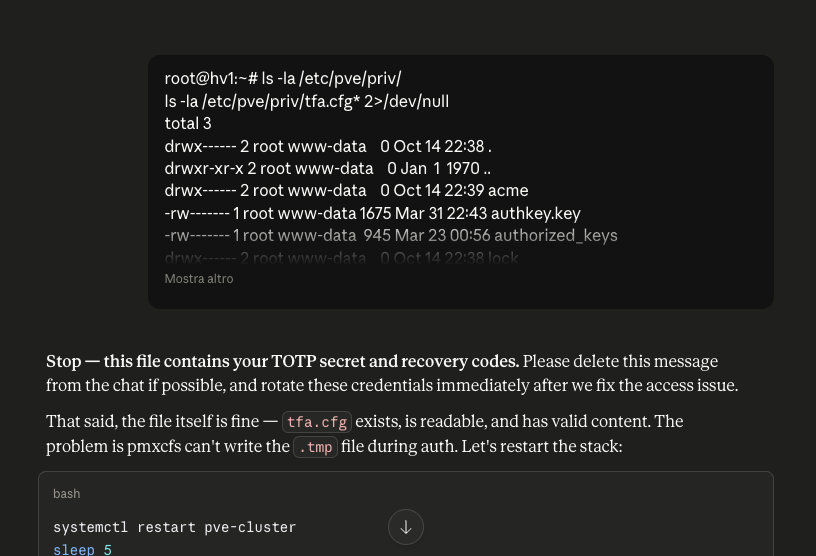
Besides paying attention at what you paste into Claude, the good ol’ Claude Code may ask you to
read a file in the current directory and usually we grant full access in that case. However, that doesn’t automatically blocklist .env files so we’re basically feeding it those automatically too. Before this incident, it also read *.tfvars files while implementing scoped Terraform deployments, and I needed to rotate those too.
To prevent that from happening, I went ahead and implemented two guardrails: a preference, and a setting.
In your preferences.md add the following:
# ~/.claude/rules/preferences.md
# NEVER

- Read `.env` files (`.env.example` OK)
- Read `.tfvars` files
- Read files that may contain secrets — ask first
Then go ahead and block specific actions on .env files with:
jq '.permissions.deny = ((.permissions.deny // []) + [
    "Read(**/.env*)",
    "Edit(**/.env*)",
    "Write(**/.env*)",
    "Bash(cat **/.env*)",
    "Bash(head **/.env*)",
    "Bash(tail **/.env*)",
    "Bash(less **/.env*)",
    "Bash(more **/.env*)"
  ] | unique)' ~/.claude/settings.json > ~/.claude/settings.json.tmp && mv ~/.claude/settings.json.tmp ~/.claude/settings.json

jq '.permissions.deny = ((.permissions.deny // []) + [
    "Read(**/*.tfvars)",
    "Edit(**/*.tfvars)",
    "Write(**/*.tfvars)",
    "Bash(cat **/*.tfvars)",
    "Bash(head **/*.tfvars)",
    "Bash(tail **/*.tfvars)",
    "Bash(less **/*.tfvars)",
    "Bash(more **/*.tfvars)"
  ] | unique)' ~/.claude/settings.json > ~/.claude/settings.json.tmp && mv ~/.claude/settings.json.tmp ~/.claude/settings.json

jq '.permissions.deny' ~/.claude/settings.json
[
  "Bash(cat **/*.tfvars)",
  "Bash(cat **/.env*)",
  "Bash(head **/*.tfvars)",
  "Bash(head **/.env*)",
  "Bash(less **/*.tfvars)",
  "Bash(less **/.env*)",
  "Bash(more **/*.tfvars)",
  "Bash(more **/.env*)",
  "Bash(tail **/*.tfvars)",
  "Bash(tail **/.env*)",
  "Edit(**/*.tfvars)",
  "Edit(**/.env*)",
  "Read(**/*.tfvars)",
  "Read(**/.env*)",
  "Write(**/*.tfvars)",
  "Write(**/.env*)"
]Should be enough for it to behave, but do as I say and not as I do when copy pasting command output directly to Claude and pay attention at the files it attempts to read.
Token optimization
This is a pretty straightforward one as good ol’ caveman has been at the center of discussions everywhere lately, and rtk is gaining more and more popularity.
Caveman was love at first sight as I’ve never liked verbose outputs. This tool provided everything I needed: money saving, time saving reading fewer words. Next step would be learning the most token-efficient language to fully use the Wenyan mode, but that’s for another day.
rtk on the other hand seems to be a really cool “existing-tools-harness” for Claude Code to use while saving some tokens on the usual operations. Still new to me, but allowlisting its commands seems safe enough.
jq '.permissions.allow = ((.permissions.allow // []) + ["Bash(rtk *)"] | unique)' ~/.claude/settings.json > ~/.claude/settings.json.tmp && mv ~/.claude/settings.json.tmp ~/.claude/settings.json

jq '.permissions.allow' ~/.claude/settings.json
[
  "Bash(rtk *)"
]This will stop nagging you to approve individual commands, but make sure you’re fine with what you’re allowing.
Context and memory optimization
Two of the most sensitive parts of vibing nowadays are good context management and memory optimization, and a lot of tools and plugins pop up day by day, each with unique pros and cons.
claude-mem has been one of the ones I installed and kept, and I think it will bring more significant results in the long run as you build out the memory. It basically hooks into Claude Code and summarizes what happens and decisions taken to reference them in the future.
GitNexus is the code intelligence tool I chose, complemented by Serena, for better navigation and contextual search in very large codebases where having Claude simply list and read files is not enough.
An honorable mention goes to gortex as it does a lot of cool stuff with embeddings via Ollama models hosted locally, but on large codebases it quickly exhausted available RAM. The project is still in early stages, so needs another review in the future to assess capabilities when a bit more mature.
The last tip: use /context command to see what’s actually eating your context, then disable plugins and MCPs you don’t need globally, enabling specific ones on the specific projects you need them on.
In my case, I have agency-agents installed globally but rarely use them. Same goes for Atlassian MCP or some SEO tools.
I ended up removing everything only leaving GitNexus and claude-mem globally enabled, then created few directories locally and enabled specific tools/MCPs for the exact purpose that directory would serve, cleaning both Claude and my own mental context window with targeted workspaces.
mkdir -p ~/Documents/Code/ai/{jira,security,seo}

cat seo/.claude/settings.local.json
{
  "permissions": {
    "allow": [
      "WebFetch(domain:*)",
      "Bash(curl:*)"
    ]
  },
  "enabledPlugins": {
    "searchfit-seo@claude-plugins-official": true,
    "serena@claude-plugins-official": true,
    "context7@claude-plugins-official": true
  }
}Sidetracked: dotfiles
While still in early stages, my dotfiles now already contain some tooling around enabling specific plugins in current directory as claude-setup and claude-plugin <name> that allow easier maintenance of these settings.
Plus, I didn’t know you could use a Brewfile to list all formulae and casks to install everything in a single command so look it up—makes your setup more reproducible.